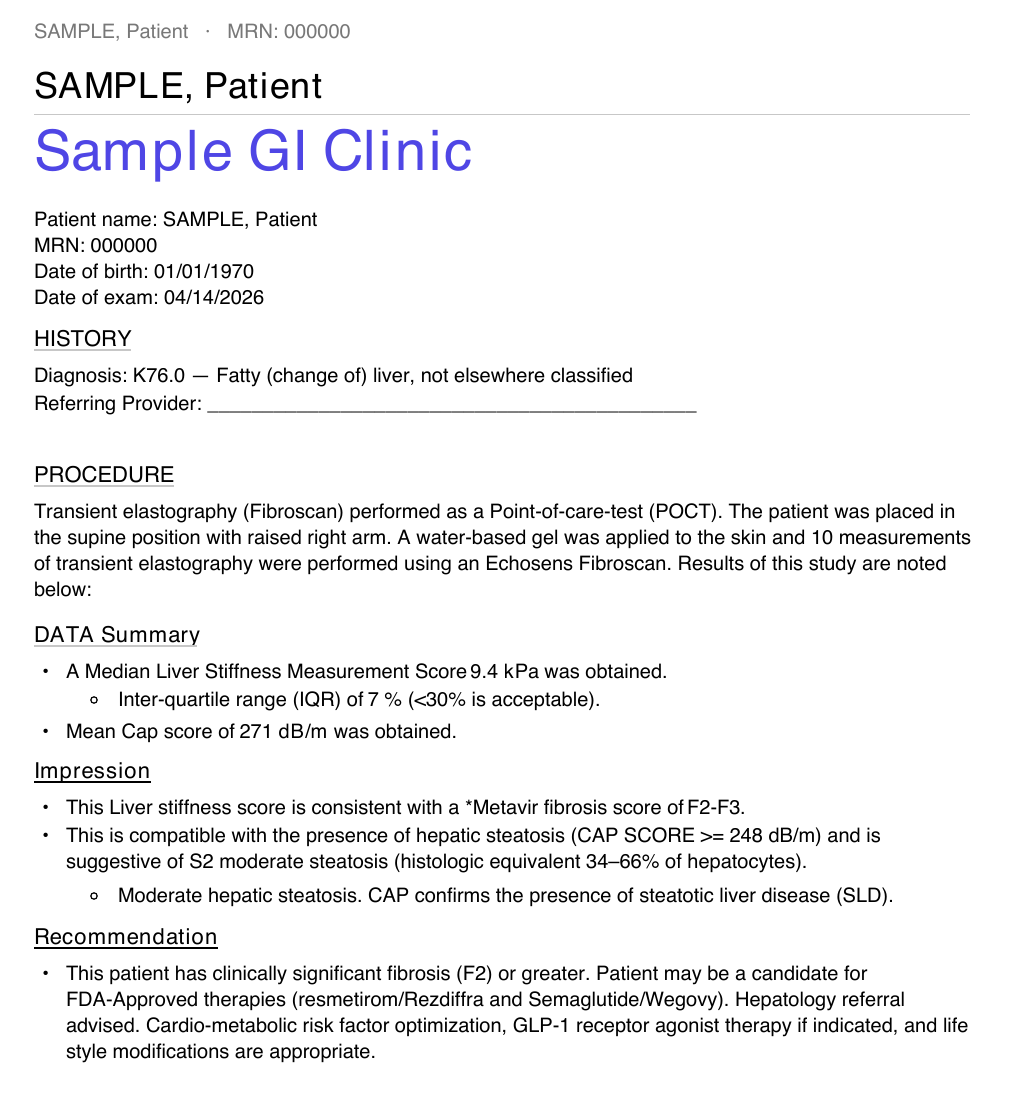
DropScan reads the numbers off the machine's printout, including all ten shots, and lays them out in your clinic's report format. You read the study. DropScan does the typing.
You make every clinical call. DropScan handles the transcription in between.
Check the exam quality on the printout the way you do today: ten valid shots, IQR/median in range, the right probe.
Drop the printout in as a PDF or a photo. One study, or the whole session at once. DropScan pulls every field you would otherwise type:
DropScan drafts the report from those numbers in your clinic's format. You review the impression and recommendation, fix anything in one click, and sign.
Print it for the chart, email it, or paste it into a portal message. One PDF per study, or a combined PDF for the whole batch.
DropScan runs on your computer, in your browser. Names, dates of birth and MRNs are read on the device and stay there. Measurements are read securely, with every patient identifier masked out before anything is processed.
The output matches what your practice already prints, so nothing changes downstream.
Your clinic name, logo color, address and signing physician on every report.
Clinical, patient-friendly or terse wording for fibrosis stage, steatosis grade and recommendations.
History, procedure, data summary, impression, recommendation, notes and e-signature. Keep the ones you use.
Overrule the calculated stage or grade, edit the impression and recommendation wording, or correct any extracted field before you sign.
Send a note and we'll set up a short screen-share. Bring a couple of de-identified printouts and watch them turn into reports.
Request a demo admin@dropcharge.app